WebSearch
Web Search 🔎
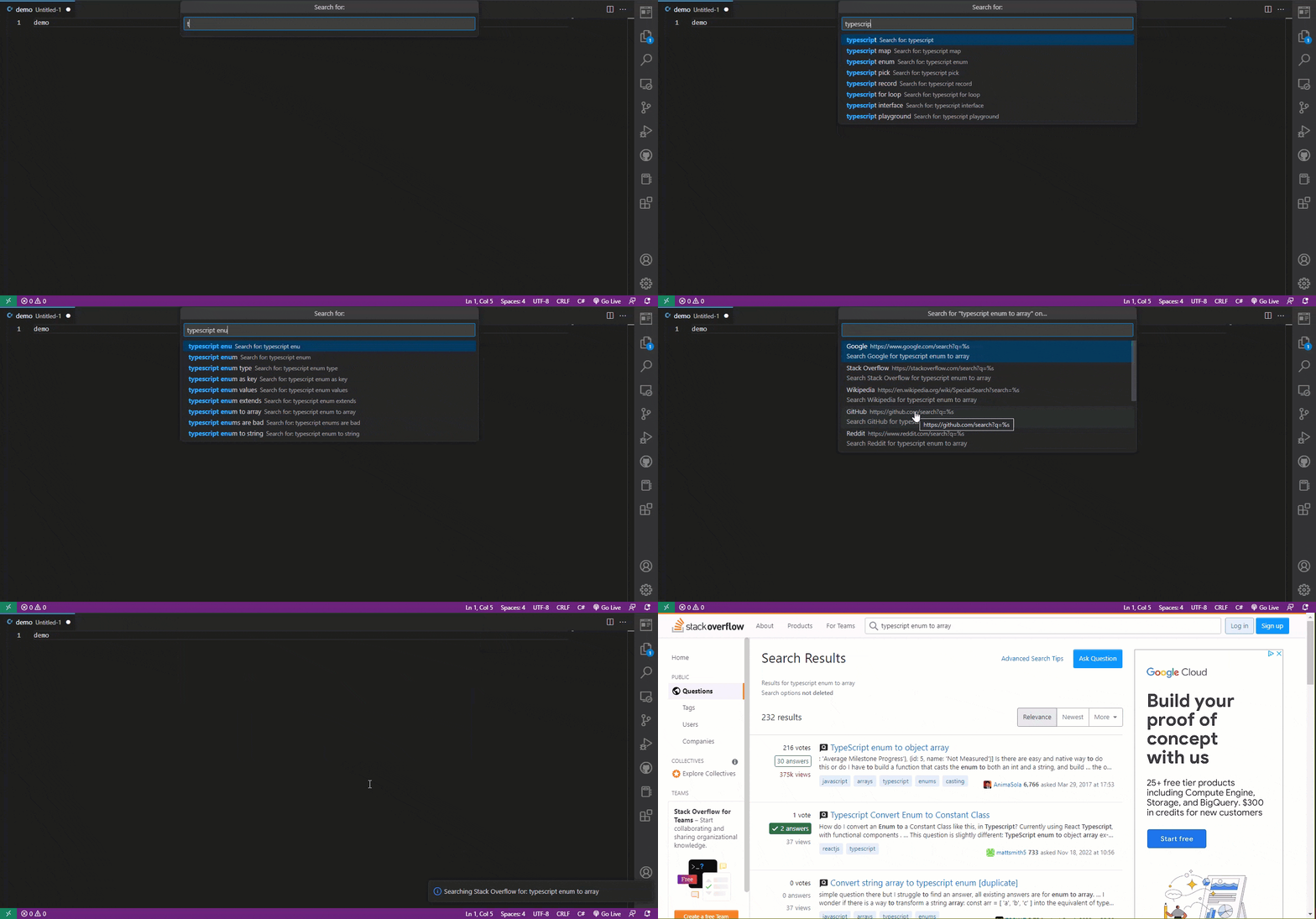
This extension allows you to search the web in your favorite search engines / websites (editable in extension settings), getting input either from selected text or direct entry in the extension’s search bar.
Features ✨
- Add multiple search engines in the extension settings and pick from them when performing a search
- Suggests search queries as you type, using Google Autocomplete
- Easy to use and configure
- Runs on Visual Studio Code for the Web (vscode.dev)
- Keyboard shortcut to perform a quick search Alt+`
- Type a search directly using the search bar (if no text is selected, it will ask for input)
- Great for testing SEO and web development projects
- Simple and clean Command Palette and context menu entries
- Walkthrough to help you get started using the extension
- JSON snippet to help you customize your default search engines
- Full control over the extension’s information and warning notification messages
- Option to allow appending your own query when performing a search using selected text
- NEW Option to keep the search bar open, even if it loses focus
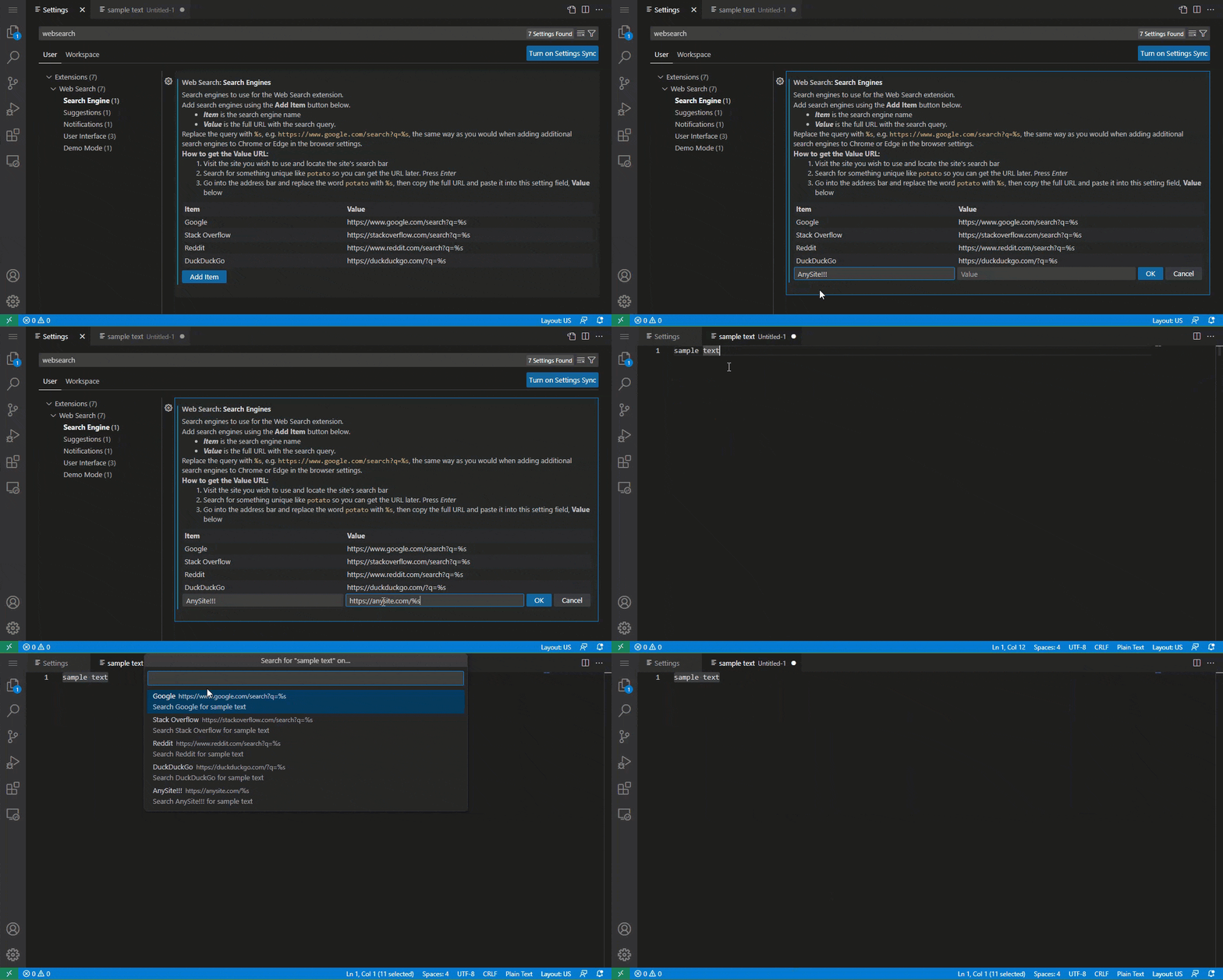
- Lots of extension Settings for your own customizations (choose literally any website with a search feature)
How To Use 👇
This extension comes packaged with a walkthrough. Use it to learn how to use the extension. (run Get Started: Open Walkthrough from the Command Palette)
You can utilize the extension in many different ways:
Via Context Menu 🖱️
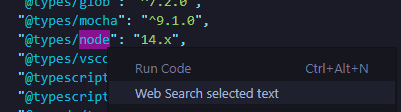
- Select the text in your code to search for
- Right click and select “Web Search selected text” from dropdown menu
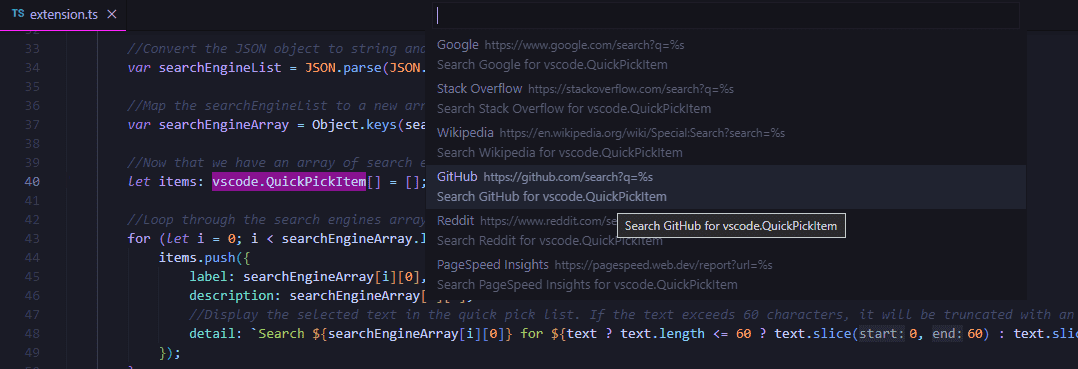
- Select the search engine you want to use (add more in the extension settings)
Via Search Bar 🔎︎
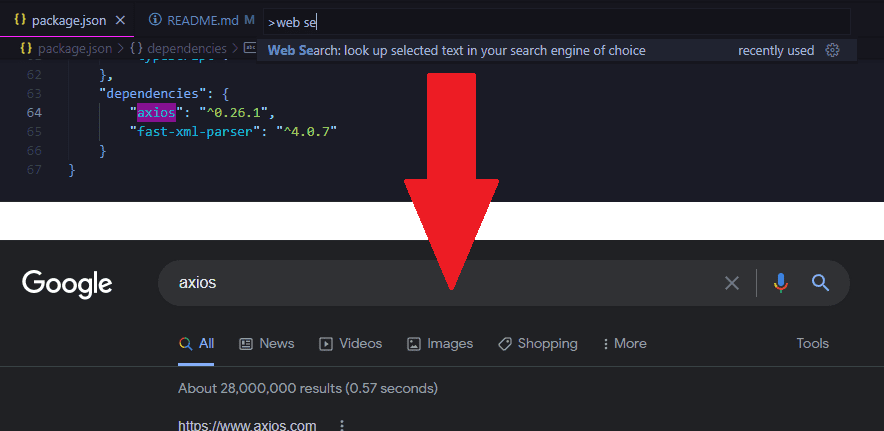
- Use the keyboard shortcut Alt+` or Command Palette entry of Web Search
- Type in the search term you want to search for into the search bar
- Select the search engine you want to use (add more in the extension settings)
Via Keyboard Shortcut ⌨️
- Select the text in your code to search for
- Use the keyboard shortcut Alt+\` (Alt+s on Linux)
- Select the search engine you want to use (add more in the extension settings)
Via Command Palette ☰
- Select the text in your code to search for
- Open the Command Palette and select the “Web Search” item from the dropdown menu
- Select the search engine you want to use (add more in the extension settings)
Extension Settings ⚙️
webSearch.searchEngines
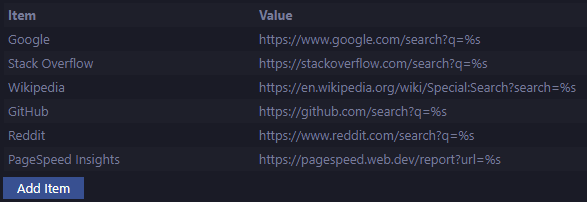
Search engines to use for the Web Search extension. Replace the query with %s, e.g. https://www.google.com/search?q=%s, the same way as you would when adding additional search engines to Chrome’s settings.
Use the extension settings to manage the search engines easily by pressing the Add Item button (shown below).
How to get Your Own Search Engine URLs:
- Visit the site you wish to use and locate the site’s search bar
- Search for something unique like
potatoso you can get the URL later. Press Enter - Go into the address bar and replace the word
potatowith%s, then copy the full URL and paste it into the setting Value field
Search Engine Examples
Want to search for the selected code on Claude (Anthropic)?
- Set it to
https://claude.ai/new?q=%s
Want to search for the selected code on GitHub?
- Set it to
https://github.com/search?q=%s
Want to search for the selected code definition on Microsoft Docs?
- Set it to
https://docs.microsoft.com/en-us/search/?terms=%s&category=Reference&scope=.NET
Want to run the selected URL on Google’s PageSpeed Insights for search engine optimization testing?
- Set it to
https://pagespeed.web.dev/report?url=%s
webSearch.enableContextMenu
Allows the user to enable or disable the right click context menu. Set to true to enable, false to disable.
webSearch.allowManualSearch
Enable the extension to run when no text is selected, asking the user to enter a search query manually. Set to true to enable, false to disable.
webSearch.defaultSearchEngines
Default search engines to use for the Web Search extension - essentially Demo Mode (the extension’s walkthrough will help you through this). If you want to use your own, disable the new checkbox webSearch.useDefaultSearchEnginesList
webSearch.useDefaultSearchEnginesList
Enable the Web Search extension to use default values. Disabling this will favor your own custom search engines list entered in webSearch.searchEngines.
webSearch.messageLevels
Allows the user to control the levels of message output from the extension.
webSearch.allowSuggestions
Adds support for Google suggestions / autocomplete for the extension. Start typing your search query and it will suggest queries.
webSearch.addToSelectedText
When using the extension with selected text, this setting will allow you to elaborate on the selected text before performing the search. If this setting is enabled, the search bar will prompt for additional content to append to the end of the query.
webSearch.keepSearchBarOpen
When using the extension, this setting will keep the extension active (persistent), even if focus is lost from the search bar or search engine selection dropdown. This can be useful if you wish to copy multiple parts of code to perform a search, or are referencing different sections. Set to true to enable.
webSearch.openInIntegratedBrowser
This setting will allow you to open search results in the integrated browser instead of the default system browser. This can be useful for users who prefer to keep their browsing within VS Code or want a more seamless experience. If you wish to open search results in your default system browser, simply set webSearch.openInIntegratedBrowser to false (true by default).
Future Development Ideas and To-dos 📝
- If selected text is a URL, open it directly or run it through PageSpeed Insights
- Add new setting to allow custom search icons on site list, or turn icons off
- Examine performance analysis of code to find potential optimizations
- Add setting to allow the search results screen to be persistent too
- Add
webSearch.addToSelectedTextto the extension’s walkthrough? - Add
webSearch.keepSearchBarOpento the extension’s walkthrough? - Add ability to run extension from selected text in the terminal
- Add support for more autocomplete search engine sources
- Code a new setting to control user-defined search verbs
- Translate the extension to other languages
➕ Have a feature you’d like me to implement? Submit a feature request on the Repo’s Issues page!
Completed To-dos ✔️
Re-organize UI setting subcategory with new subcategory for something specifically for search functionsDisplay information message when searching directly (only 1 search engine), inviting user to add moreAdd second command to the extension of just “Web Search” as not all searches are of selected textTake new setting that keeps the search bar to persist even when losing focus out of betaConvert search engine settings to an array, allowing multiple search engines to be usedEnable extension to run on all UI elements (currently only works on Text Editor UI)Review when clauses in package.json as upcoming changes were noted in VS Code v1.76Try making the newWebSearch.webSearchcommand the default key command on LinuxAdd icons to the QuickPick menu and display them on the search engine submenuUse only one search engine (no submenu) if only one search engine is in settingsAdd a submenu to the function and allow multiple websites to be searched fromShow message to user if they added a search engine that doesn’t have a queryIf no text selected, running the extension will prompt for text to search forReplace the search bar step image on the walkthrough to show autocompleteAdd option to add manual text to selected text when performing a searchPhase out old webSearch.searchEngine setting (use deprecationMessage)Replace screenshots of search bar with new Google suggestion offeringsUse JSON pattern restriction for search engines setting to validate URLsAdd new setting that will keep the search bar open after it loses focusTake new setting to allow elaborating on selected text out of betaRework extension settings to better allow removing/editing entriesAdd setting toggle to enable/disable search if submenu dismissedDisplay search query in QuickPick URL (maybe, might be too long)Add screenshot of new extension settings search engine managerRemove duplicated release notes and consolidate in ChangelogWrite a step-by-step guide for how to get search engine URLsUse native browser opening to prevent external URL promptsAdd setting to disable information messages when searchingAllow a preferred default search engine to be set in settingsOpen search results in integrated vscode browser (webview)Ensure keybinding works properly on all operating systemsEdit QuickPick detail, or allow user to write their own detailEnsure the extension uses the new LogOutputChannel APIInvestigate adding autocomplete engine to manual entryConsolidate commands into one command palette entryAddwebSearch.messageLevelsstep to the walkthroughUpdate extension icon and/or add more device sizesAdd extension setting to toggle the right click menuShow search engine name in the Command PaletteAdd more default search engines for the extensionDecide on updating brace formatting preferencesAdd GIF animation to show how extension worksEnable extension to run on VS Code for the webStreamline extension by reducing dependenciesAdd more GIFs to demo the extension usageAdd monitors for code dependency changesEnforce that search engines begin with http*Update search bar walkthrough screenshotsIf no search engine is selected, do nothingAdd keyboard shortcuts to perform searchAdd more screenshots of extension usageUse default query if no query is providedImprove validation of search URL checksAdd screenshots of the new settingsMove images to consolidated folderAdd autocomplete to walkthroughPerform additional code cleanupPerform more code refactoringTake autocomplete out of betaAdd license to the projectFix unit test systemWrite more tests
Waiting on API Updates ⌛
- Add links from extension settings mentioning other settings without affecting walkthrough button links
- Remove “selected text” from command palette entry title without adding a new command
- Add dynamic sub context menu to right click menu containing all search engines
- Use variables in setting descriptions, so that the keybindings are dynamic
- Move cursor to the end of the search bar when using selected text
- Add tooltips to quickpick items (noted in VS Code v1.76)
Requirements 📦
- Visual Studio Code or Visual Studio Code for the Web running on any operating system
- Will work with Visual Studio Code 1.120.0 or later (more recent)
Known Issues 🐛
- If using VS Code for Web, you may receive popups asking “Do you want Code to open the external website?”. To have URLs open immediately, follow these quick and easy steps:
- On the popup that appears, click the Configure Trusted Domains Button
- Select the level of trust you wish to give to the website.
- The next time you perform searches on that search engine’s website, it will just open without prompting you.
Sponsor This Project ❤️
I spend a lot of time improving and maintaining this extension. If you’d like to sponsor this project, please visit my GitHub Sponsor page to learn more.
One of the perks of being a sponsor is that you will even show up on this very README page!
Release Notes 🆕
See CHANGELOG file.
Software Details 💿
- Author: Ben Rogers
- Date Published: 4/19/2022, 10:10:14 AM
- Publisher: Ben Rogers
- Software Version: 7.0.6
- Last Updated: 10/09/2026, 19:09:00 AM
- Average Rating: 5.0
- Rating Count: 1
- Category: DeveloperApplication
- Unique Identifier: BenRogersWPG.websearchengine
- Install URL: https://marketplace.visualstudio.com/items?itemName=BenRogersWPG.websearchengine
- Project URL: https://github.com/BenRogersWPG/WebSearch
-
&replace=%241&label=Marketplace%20rating)
